
 EN
 CN
When selecting a server,CPU and memory often take center stage,while hard drives are frequently relegated to the role of"good enough"supporting components.In reality,the opposite is true:performance bottlenecks in most production environments ultimately occur at the storage layer.Slow database queries,delayed website responses,and stuttering data loading during AI training—the root cause of these issues is rarely an insufficiently fast CPU,but rather hard drive IOPS or latency holding the system back.
Selecting a server hard drive is essentially about striking a balance between capacity,speed,reliability,and cost.Understanding the fulcrum of this balance is far more important than memorizing a list of specifications and model numbers.
Hard Drive Types:Fundamental Differences Between HDD,SSD,and NVMe
Server hard drives currently fall into three main technological categories:Hard Disk Drives(HDD),SATA Solid-State Drives(SATA SSD),and NVMe Solid-State Drives.The differences between them are not merely a matter of being slightly faster or slower;they are exponential.
HDDs rely on read/write heads moving across high-speed rotating platters.Seek time and rotational latency set a ceiling on their performance;random 4K read IOPS typically range from 80 to 120,with average latency between 8 and 12 milliseconds.Their sole advantage is the lowest cost per terabyte,making them suitable for backup storage,archiving,and cold data tiers.
SATA SSDs replace rotating platters with flash memory chips,slashing latency to 0.1–0.2 milliseconds and boosting random 4K read IOPS to the 90,000–100,000 range.For web servers and standard application servers,SATA SSDs deliver a very smooth experience.However,their performance ceiling is constrained by the SATA interface;no matter how fast the flash memory is,the theoretical bandwidth of the SATA interface is limited to just 550–600 MB/s.
NVMe SSDs completely bypass the SATA interface bottleneck,communicating directly with the CPU via PCIe lanes.This enables support for tens of thousands of parallel queues,whereas SATA supports only a single queue with a depth of 32 commands.Architectural differences are directly reflected in performance metrics:NVMe Gen3 drives can achieve random 4K read IOPS of 450,000 to 500,000,while Gen4 drives reach between 600,000 and 1,000,000.For databases,high-concurrency applications,and AI training workloads,NVMe delivers a qualitative leap—transforming performance from sluggish to seamless.Real-world tests show MySQL query latency of just 0.1 to 0.3 milliseconds with NVMe,compared to 12.4 milliseconds with HDDs.
Interfaces and Protocols:The Hidden Variables Determining the Performance Ceiling
A drive's interface dictates its performance ceiling—a factor often overlooked during the selection process.
The SATA interface is the standard for consumer and entry-level enterprise products,featuring 6Gbps bandwidth and a single-queue architecture.While SATA SSDs are suitable for boot drives,standard web applications,and moderate workloads,the single-queue design becomes a significant bottleneck for high-concurrency databases.
The SAS interface is the mainstream choice for enterprise-grade HDDs and some SSDs.It supports dual-port redundancy and transfer rates of 12Gbps,offering reliability far superior to SATA.SAS drives are typically deployed in RAID arrays,making them ideal for storage scenarios requiring high availability.
The U.2 interface is the standard form factor for NVMe SSDs in enterprise servers.Utilizing PCIe 3.0 x4(or faster)lanes to deliver bandwidth approaching 4 GB/s,it is the dominant interface for high-performance storage today.Note that U.2 drives require a dedicated backplane;connecting them via an adapter card can result in performance degradation.
Key Metrics:Look Beyond Capacity and the"SSD"Label
When selecting a drive,the following metrics are more indicative of the actual user experience than mere capacity.
IOPS(Input/Output Operations Per Second)is the core metric for measuring a drive's random read/write capabilities.Databases,virtualization environments,and multi-user concurrent workloads are highly sensitive to IOPS.HDD performance is in the range of 100 IOPS,SATA SSDs reach around 100,000,and NVMe drives hit 500,000 to 1,000,000—with each order-of-magnitude jump representing a massive,transformative improvement in performance.Latency determines the response speed of a single operation.The millisecond-level latency of HDDs accumulates during database transaction processing,whereas the microsecond-level latency of NVMe makes"waiting"virtually disappear.
DWPD(Drive Writes Per Day)measures how many times the entire drive can be overwritten daily within the warranty period.Enterprise-grade SSDs typically offer an endurance rating of 1 to 3 DWPD;write-intensive scenarios(such as log servers or video rendering)require models with higher DWPD ratings.
MTBF(Mean Time Between Failures)reflects drive reliability.The MTBF for enterprise-grade HDDs is usually over 2 million hours,with high-end models reaching up to 2.5 million hours.
Selection Steps:Start with the workload,not the specifications.
Step 1:Determine whether your workload is IO-intensive or throughput-intensive.Databases,virtualization,and container clusters are IO-intensive and highly sensitive to IOPS and latency,making NVMe a logical choice.File servers,backup storage,and video archiving are throughput-intensive;while they require high sequential read/write speeds,they are less sensitive to random IOPS,making high-capacity HDDs or SATA SSDs more cost-effective.
Step 2:Estimate capacity requirements and allow for a buffer.Storage capacity planning must account for data growth rates,RAID redundancy overhead,and SSD over-provisioning.QLC SSDs require approximately 25%free space to maintain SLC cache performance;this portion cannot be counted as usable capacity.
Step 3:Match interfaces with the server platform.Verify which interface types are supported by the server's backplane.If a server only has a SATA backplane,forcing the use of U.2 NVMe drives via adapters may result in performance loss and stability risks.
Step 4:Consider RAID and redundancy strategies.Enterprise scenarios typically require RAID to ensure data security.The dual-port design of SAS drives offers a natural advantage in RAID environments,whereas NVMe RAID configurations require verifying support from the controller or software solution.
Step 5:Evaluate the Total Cost of Ownership(TCO).The cost of a hard drive extends beyond its initial purchase price to include expenses related to power consumption,cooling,replacement due to failure,and maintenance.While the cost per gigabyte of NVMe drives is higher than that of SATA SSDs or HDDs,the performance gains they deliver for I/O-sensitive workloads can translate into increased business throughput and reduced latency-related costs.
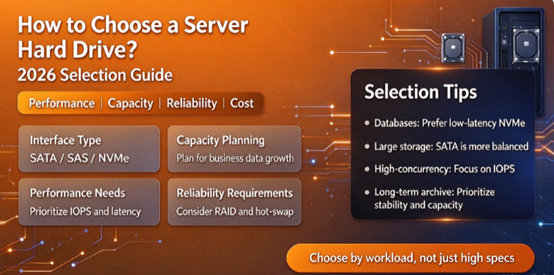
The core principle for selecting server hard drives is simple:align storage performance with the sensitivity of the workload.Prioritize IOPS and latency for I/O-intensive workloads,and prioritize capacity and sequential speeds for throughput-intensive ones;for cost-sensitive scenarios,opt for HDDs or SATA SSDs.Adhering to this logic ensures the right choice is made.