
 EN
EN
 CN
CN
"IPv4 access works fine, but everything gets stuck with IPv6," and "The server is clearly configured with an IPv6 address, but the website just won't open"—these problems are becoming increasingly common. With the widespread adoption of 5G and the Ministry of Industry and Information Technology's continued promotion of IPv6 deployment, more and more users and devices are prioritizing IPv6 for network access. However, in actual business operations, it's common to encounter situations where an IPv6 address is configured, but the website remains inaccessible.
The root cause of this problem is often not "IPv6 is faulty," but rather a gap in the connection between five key components: address, routing, DNS, firewall, and web service monitoring. This article starts by discussing the differences between IPv4 and IPv6 access, systematically outlining six core reasons why IPv6 websites cannot be accessed, providing a complete troubleshooting process and answers to frequently asked questions, helping you quickly pinpoint the problem.
IPv4 vs. IPv6 Access Differences: Two Incompatible Protocols
Before understanding the access differences, let's briefly review the distinctions between the two.
IPv4 uses a 32-bit address format, providing a maximum of approximately 4.3 billion addresses. With the explosive growth of internet devices, IPv4 addresses have long been exhausted. IPv6 uses a 128-bit address format, accommodating approximately 3.4 × 10³⁸ addresses—enough to assign an IP address to almost every grain of sand on Earth.
Besides the number of addresses, there are several key differences:
Different Address Formats: IPv4 uses dotted decimal notation (e.g., 192.168.1.1), while IPv6 uses colon-separated hexadecimal notation (e.g., 2001:db8::1).
Different Configuration Methods: IPv4 primarily relies on DHCP for manual or automatic address assignment, while IPv6 supports Stateless Address Autoconfiguration (SLAAC), allowing devices to automatically generate IP addresses. Theoretically more convenient, but this also means that troubleshooting can be more lengthy and covert when problems arise.
Independent Firewall Systems: IPv4 and IPv6 firewall rules are completely independent and not interchangeable. Many servers allow IPv4 ports by default but strictly block IPv6 traffic—one of the most common reasons for "IPv4 works, IPv6 doesn't."
The most crucial point: IPv4 and IPv6 are two independent protocols and are incompatible. When only IPv6 is configured, website programs, port listening, and domain name resolution are all adapted to the IPv6 protocol. When ordinary IPv4 users access the site, the device cannot recognize the IPv6 server address, resulting in a direct connection failure. The reverse is also true—if your website only has an A record (IPv4) configured and no AAAA record (IPv6), IPv6 users will not be able to resolve any address and will naturally be unable to access the site.
Six Core Reasons for Inaccessible IPv6 Websites
Reason 1: Domain Name Lacks AAAA Record, or AAAA Record Configuration is Incorrect
Many website owners, after enabling IPv6 on their servers, only configure A records (IPv4), mistakenly believing that the system will automatically be compatible with IPv6. In reality, if you only configure A records, IPv6 users will not be able to resolve any records when accessing the domain name and will naturally be unable to access the site. Some website owners also enter internal IPv6 addresses starting with fe80 as the resolution value. Such link-local addresses can only communicate within the same Layer 2 network and cannot be directly used for public network access.
Reason 2: Web Service Not Listening on IPv6 Ports
Web services like Nginx and Apache only listen on IPv4 addresses by default. Taking Nginx as an example, simply writing `listen 80` only allows receiving IPv4 traffic; without the `listen [::]:80 ipv6only=off` configuration, even if the server has an IPv6 address, the website program will not respond to IPv6 requests. This is a configuration blind spot that website administrators often overlook.
Reason 3: Firewall or Security Group Separately Blocking IPv6 Traffic
IPv4 firewalls and IPv6 firewalls are independent. Many system administrators only allow iptables (IPv4) ports 80 and 443, without configuring IPv6 rules for ip6tables or firewalld. Cloud server security groups also need to separately allow IPv6 incoming traffic. If the firewall directly drops IPv6 request packets, the client will not receive a response for a long time and will prompt a connection timeout. Furthermore, if IPv6 is enabled but ICMPv6 is disabled, it will also cause neighbor discovery and route detection failures, resulting in intermittent connectivity issues. Reason 4: IPv6 Address Prefix Changes Cause Resolution Failure
Unlike fixed IPv4 addresses, most data centers, home, and enterprise broadband use dynamic prefixes for IPv6. Regular network cutovers by ISPs, data center routing adjustments, and equipment restarts all cause automatic changes to the IPv6 prefix. If the domain's AAAA record is still bound to the old IPv6 address, the resolved address will become invalid after the prefix change, preventing users from accessing the server. If the server's firewall or security group is bound to the old IPv6 prefix, the new address will also be blocked.
Reason 5: Missing Router and Gateway Configuration
The server already has a global IPv6 address, but public network testing fails—in this case, you usually need to check the routing table first. Execute `ip -6 route show | grep default`. Normally, there should be at least one default route. If there is no output, it means the default route is missing, and external network traffic cannot return packets normally, resulting in continuous timeouts. Many cases of "IPv6 configured but ping unreachable" are rooted in incorrect default route configuration, not DNS issues.
Reason 6: CDN IPv6 not enabled, or CDN and origin server configurations inconsistent.
If your website uses a CDN, simply adding an AAAA record in the DNS backend is insufficient. You need to enable IPv6 in the CDN console and configure the AAAA record to point to the CDN node; it cannot directly resolve the origin server's IPv6. Otherwise, it will bypass acceleration policies, causing protection and acceleration to fail.
Complete Troubleshooting Process: Check in order, don't change everything at once.
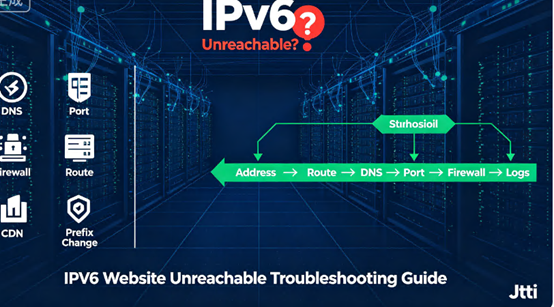
When troubleshooting, it is recommended to follow the order of "Address → Routing → DNS → Port → Firewall → Application Logs." Do not change multiple configurations simultaneously, otherwise it will be difficult to determine which step is truly effective.
Step 1: Confirm that the server's IPv6 address exists and is a public IP address. Execute `ip -6 addr show` to confirm if there is a scope-global IPv6 address. If only a link-local address starting with fe80 is available, it means that a public IPv6 address has not been assigned, and you need to enable it in the service provider's console.
Step 2: Check the default route. Execute `ip -6 route show | grep default` to confirm if there is a default gateway. If there is no output, you need to manually add a default route or check the network configuration file.
Step 3: Test if the server can access the public IPv6 network. Execute `ping6 -c 3 2001:4860:4860::8888` (Google Public DNS IPv6 address). If it returns "Network is unreachable", it usually indicates a missing default route.
Step 4: Verify domain name resolution. Use `dig yourdomain.AAAA` or `nslookup -type=AAAA yourdomain.AAAA` to query the AAAA record. Confirm that the IPv6 address pointed to by the resolution matches the server's current address.
Step 5: Check the web service listening status. Confirm that Nginx/Apache, etc., are listening on both IPv4 and IPv6 ports simultaneously. Nginx needs to have both `listen 80` and `listen [::]:80` enabled.
Step 6: Check the firewall and security groups. Allow ports 80 and 443 under IPv6 separately, and allow the ICMPv6 protocol. Step 7: If using a CDN, log in to the CDN console and enable IPv6.
Frequently Asked Questions (FAQs)
Q1: My server has an IPv6 address, why can't users access it?
A: Having an address doesn't mean the domain name can resolve to it. Check if the DNS has an AAAA record, and whether the address pointed to by the AAAA record matches the server's current IPv6 address. Also check if the web service is listening on the IPv6 port and if the firewall is allowing IPv6 traffic.
Q2: IPv4 access is normal, but IPv6 access times out. What's the reason?
A: First check the firewall—IPv4 and IPv6 firewall rules are completely independent. Many servers allow IPv4 by default but block IPv6. Secondly, check if the web service is listening on the IPv6 port.
Q3: The website was previously accessible via IPv6, but suddenly it's not. What happened?
A: Check if the IPv6 address has changed. ISPs or data centers may periodically change IPv6 prefixes. If the domain's AAAA record is bound to an old address, it will become invalid. Update the AAAA record and simultaneously update the firewall and security group's allow rules.
Q4: I only want to use IPv4, can I disable IPv6?
A: Yes. Uncheck "Internet Protocol Version 6 (TCP/IPv6)" in the Windows network adapter properties. However, it is recommended to retain the IPv6 dual-stack configuration to adapt to the increasing number of IPv6-preferred network environments.
Q5: Does IPv6 deployment affect SEO?
A: Yes. Search engine crawlers all support IPv6 crawling. If IPv6 consistently times out, crawlers in some IPv6 network environments will be unable to access pages, resulting in decreased crawling frequency and slower indexing of new pages. Visitors will encounter website inaccessibility, leading to a significant increase in bounce rate. Search engines will judge this as a poor user experience, dragging down keyword rankings.
In conclusion:
90% of the time, the inability to access IPv6 websites is not due to a problem with IPv6 itself, but rather a broken link in the configuration chain. By troubleshooting step-by-step in the order of "address → routing → DNS → port → firewall → application logs," most problems can be located within 10 minutes.
For website owners who are deploying or planning to deploy IPv6, a flexible and stable cloud server is essential. Jtti offers cloud server products covering data centers in Hong Kong, Japan, the United States, and Singapore, supporting dual-stack IPv6 deployment to help your business smoothly transition to the next-generation internet protocol.







