
 EN
EN
 CN
CN
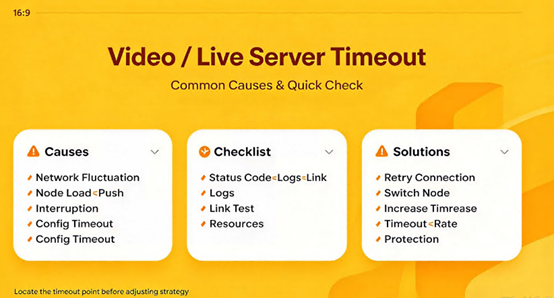
In video-on-demand and live-streaming services, "timeouts" are among the most disruptive issues for user experience. A one-second freeze in a live stream increases the user bounce rate by 11%, while a freeze lasting longer than three seconds causes 40% of viewers to abandon the stream. At its core, a timeout occurs when data fails to be transmitted or responded to within the expected timeframe—a problem that can originate anywhere along the path: the ingest (source) side, the transmission network, server-side configurations, or the playback client’s buffering strategy.
This article breaks down the common causes of—and solutions for—timeouts, following the end-to-end flow: Ingest → Transmission Network → Server-side → Playback Client.
Ingest Side: Balancing Bitrate, GOP, and Uplink Bandwidth
The ingest side is the first potential point of failure. The most common root cause is an ingest bitrate that exceeds the capacity of the available uplink bandwidth. For 720P content, it is recommended to keep the bitrate between 2–3 Mbps, and no higher than 4 Mbps. If the bitrate is set too high, data packets begin to queue or get dropped on the uplink, delaying their arrival at the server and triggering a timeout.
Improper GOP (Group of Pictures) settings can also cause issues. When a player first loads a stream, it must locate the nearest I-frame (keyframe) to begin decoding; a longer GOP results in a longer wait time for the first frame. For live streaming, a GOP duration of 1–2 seconds is generally recommended. Cloudflare suggests an iterative approach: start with a 4-second GOP. If playback is stable but latency remains high, reduce it to 2 seconds; if buffering or freezing occurs, increase it to 8 seconds.
Insufficient encoder performance is another frequently overlooked factor. If the CPU or GPU cannot keep up with real-time encoding, the ingest process itself becomes a bottleneck, preventing data from being sent out on time. To diagnose this, check the CPU usage on the ingest device; if necessary, reduce encoding complexity or enable hardware-accelerated encoding.
Transmission Network: Cross-Border Connectivity and Protocol Selection
Timeouts occurring within the transmission network are typically rooted in latency or packet loss along the network path. In cross-border live streaming, packet loss rates on standard international network routes can surge from 1% to over 20% during evening peak hours. Long-lived streaming connections are highly sensitive to such packet loss—a single significant fluctuation can trigger a connection reset.
The choice of playback protocol directly influences the frequency of timeout events. RTMP and HTTP-FLV are low-latency protocols, typically offering a latency of around 5 seconds. HLS, by contrast, relies on segmented transmission; players generally buffer 3–4 segments before beginning playback, resulting in a latency of 10–30 seconds—higher, but with better overall playback stability. If your service is latency-sensitive, HTTP-FLV is the better choice; if compatibility is the primary concern, the HLS buffering mechanism can actually help prevent playback interruptions caused by transient packet loss.
Server-Side: Timeout Parameters and Connection Management
Improper server-side timeout configuration is a direct cause of "server timeout" errors. For video distribution services built using Go, three specific timeout parameters must be explicitly configured:
`ReadTimeout` should ideally be set to ≤15 seconds to prevent malicious requests—such as those with excessively large headers or "half-open" connections—from consuming file descriptors. `WriteTimeout` should be set to ≤30 seconds, aligned with the maximum transmission window for video segments (e.g., a 10-second HLS segment plus its associated buffer). `IdleTimeout` should be set to approximately 90 seconds, paired with a `KeepAlivePeriod` of 30 seconds, to prevent the accumulation of idle connections. Neglecting to set `IdleTimeout` is the most common cause of file descriptor leaks in production environments; if a connection remains open without transmitting data, the server will not proactively close it.
For scenarios utilizing streaming servers like Wowza, parameters such as `ClientTimeout` and `IdleFrequency` also require careful attention. In live streaming contexts, these values are best set between 125 and 250 milliseconds. Furthermore, ensure that `IdleWorkers/CheckFrequency` is no greater than one-quarter of the `ClientTimeout` value; otherwise, the frequency of idle connection checks will not align with the timeout logic.
Buffer configurations must also be aligned with the server-side load. MistServer has a default buffer duration of 50,000 milliseconds (50 seconds), with a maximum allowable lag behind the live stream point of 45,000 milliseconds (45 seconds). If the buffer is set too small, even minor network jitters can trigger playback interruptions; conversely, setting it too large increases memory consumption and latency.
Playback Side: Buffering Strategy and Decoding Capability
Timeouts on the playback side often manifest as "buffering" states or "connection timeout" errors. Data from Tencent Cloud’s end-to-end troubleshooting indicates that an undersized playback buffer leads to frequent stuttering, while insufficient decoding power on low-end devices prevents high-definition streams from being rendered in real-time—resulting in a scenario where the network appears stable, yet the video remains frozen.
The solution is to implement Adaptive Bitrate (ABR) streaming, allowing the player to dynamically adjust the requested bitrate based on real-time network conditions and the device's decoding capacity. Additionally, the player's connection timeout threshold can be increased—for instance, extending the default 10 seconds to 15–20 seconds—to provide a more generous window for handshakes and initial frame loading in poor network environments.
Prevention and Troubleshooting: Establishing End-to-End Monitoring Baselines
When troubleshooting timeout issues, the greatest challenge is having an incomplete picture—akin to the "blind men and an elephant" parable. It is advisable to establish three sets of baseline data before launching a service: on the ingest (push) side, track uplink bitrate, packet loss, and encoder CPU usage; on the server side, monitor connection counts, timeout rates, and average response times; and on the playback side, record the time to first frame, stuttering frequency, and buffer levels. When timeout rates deviate from the norm, these baselines allow for the rapid identification of which segment is operating outside expected parameters.
For cross-border video or live-streaming services, the quality of the underlying network infrastructure serves as the first line of defense against timeouts. Utilizing cloud servers with nodes in Hong Kong or the U.S.—specifically those connected via premium routes like CN2 GIA—ensures direct, optimized connectivity across major carriers, keeping packet loss below 0.5% even during evening peak hours. A stable path back to the origin ensures that long-lived connections for both stream ingestion and delivery are less likely to be interrupted by transient congestion on the cross-border backbone network, thereby reducing the probability of timeouts at the network layer. Every plan comes with dedicated, exclusive bandwidth, eliminating the risk of "noisy neighbors" saturating the network and causing your stream packets to queue. For live streams with a fixed bitrate, the predictability of bandwidth is far more critical than peak capacity figures. Furthermore, a perpetual recurring discount policy ensures that long-term server costs remain stable and foreseeable, shielding your video operation’s budget from infrastructure price hikes.
At its core, a timeout in a video or live-streaming server simply means that "data failed to reach its intended destination within the expected timeframe." By ensuring each component performs its specific role—controlling bitrates and GOP structures at the ingest source, selecting protocols tailored to latency requirements for transmission, properly configuring timeout parameters and buffers on the server side, and implementing adaptive strategies at the playback end—timeout issues can be transformed from unpredictable, random occurrences into problems that are both identifiable and preventable.







